AI Pixel Art Generator: Turn Modern Ideas into Retro Style



Remember the charm of old-school video games with their blocky characters and simple backgrounds? That nostalgic style is making a comeback, and now you can recreate it without the hassle of placing each square by hand.
Today, technology makes it simple to create an 8-bit or 16-bit look. An AI pixel art generator turns your ideas into retro-style art. Just type in your words, and it quickly creates digital pixel designs.
Whether you’re making a game, creating social media posts, or just having fun, these tools save you lots of time. You don’t need to be an artist or know how to use complicated software.
In this guide, we will explain what a pixel art generator is, its main features, how to create a pixel art image, and why Pixele Studio has become a favorite tool.
What Is an AI Pixel Art Generator?
An AI pixel art generator is a software tool that utilizes artificial intelligence (AI) to generate pixel art images with a single click.
Pixel art is a type of digital art made up of small square blocks called pixels. It creates a retro, 8-bit style often seen in old video games, giving it a fun, nostalgic look.
Traditionally, creating pixel art used to take a lot of time since artists had to place each pixel one by one. But now, AI pixel art generators make the process quick and simple. These tools can instantly transform your ideas, text descriptions, or regular images into pixel art.
Key Features of an AI Pixel Art Generator

1. Text to Pixel Art Generation in One Click
An AI pixel art generator can create a pixel art image in just seconds using text prompts.
For example:
Prompt: “cute cat in pixel art style” – The AI instantly creates a small, colorful cat in retro pixel design.
This feature is great for anyone, whether you’re a beginner or a seasoned designer. It allows you to quickly create high-quality pixel art from your ideas, no technical skills needed.
2. No Watermark Option
If you want to use your pixel art for professional work, like in a video game or on a website, you need clean images. Watermarks can distract from the art and make it look less professional.
AI-generated pixel art usually gives you the option to download your images without a watermark. This ensures your final product looks polished and ready to use.
3. Custom Pixel Size Option
Our AI pixel art generator lets you pick the pixel size and create images in different shapes and sizes. Choose from square, portrait, or landscape layouts to fit your project.
4. Fast Generation Workflow
Making pixel art by hand can take a lot of time, but a Pixel art AI generator can create it in just seconds.
This tool is great for designers, game developers, or anyone who wants to try out different styles and ideas quickly and easily.
5. Retro Style Outputs
The AI needs to understand the style. It’s not just about creating a blurry image; it’s about using sharp edges and specific color choices.
The best tools are trained to work with retro art styles. They know how to use a few colors to create depth and shadows effectively.
6. User-Friendly Interface
The software should be easy to use without needing a manual. A good tool has a clean, intuitive interface that makes sense to both beginners and professionals.
Clear buttons and simple text boxes ensure a smooth creative process for everyone.
Create a Retro-Style Image with an AI Pixel Art Generator
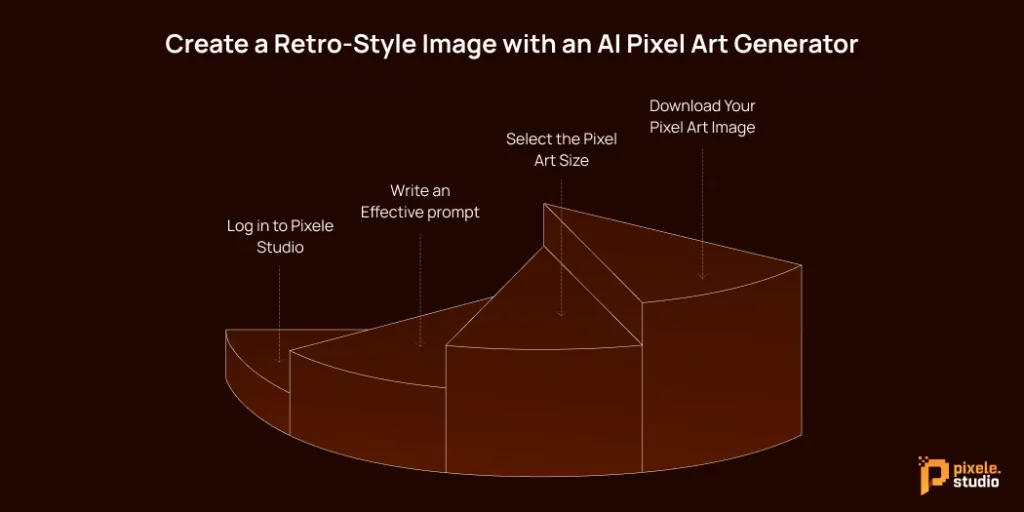
Ready to generate AI pixel art? We’ll walk you through the process using Pixele Studio as an example to show you just how easy it is.
Step 1: Log in to Pixele Studio
Go to the Pixele Studio website and sign in to use the generator features.
If you don’t have an account, creating one is quick and easy. Once you’re logged in, you’ll go straight to the main workspace.
Step 2: Write an Effective prompt
The AI generates pixel art based on your text description. Write a clear and creative prompt to get the best results.
Examples of effective prompts:
- “Cute cat in pixel art style”
- “Retro spaceship flying in space.”
- “Pixel art fantasy forest scene”
The AI will instantly transform your description into a detailed, colorful pixel art image.
Step 3: Select the Pixel Art Size
Choose the pixel size and layout for your image. Pixele Studio lets you pick square, portrait, or landscape formats depending on your project needs. Adjusting the size ensures your pixel art fits perfectly for games, websites, or social media.
Step 4: Download Your Pixel Art Image
Click “Generate” to let the AI create your pixel art image. In a few seconds, your pixel art will appear. Just click “Download” to save it to your device and use it anywhere!
Who Should Use an AI Pixel Art Generator?
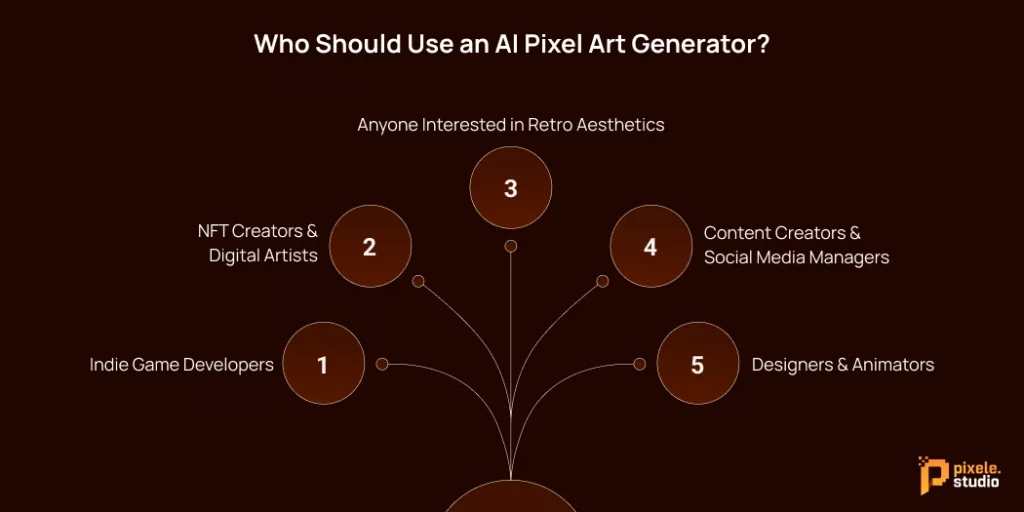
You might think AI pixel art generators are just for game designers, but many different people can benefit from them. Here’s who finds them most useful.
1. Indie Game Developers
Art can be a major roadblock for small teams or individual game developers. Hiring artists costs a lot of money and can slow down the development process.
By using an AI tool, developers can create art assets like characters, items, and backgrounds quickly without spending too much money.
2. NFT Creators & Digital Artists
The digital art market values unique styles, and pixel art is a popular choice for digital collectibles.
Artists can use AI to come up with new ideas or create the initial layers of their artwork. This speeds up their creative process, helping them create entire collections more quickly.
3. Anyone Interested in Retro Aesthetics
Maybe you just love the 90s vibe. You don’t need a reason to create art. Many people use these generators just for fun; it’s exciting to see your ideas turn into retro pictures right away.
4. Content Creators & Social Media Managers
Content creators and social media managers can use these tools to make unique pixel art for their posts, stories, and ads. The AI helps them keep a consistent retro look across all their social media channels, saving time and energy.
5. Designers & Animators
Graphic designers can use AI tools to create placeholders or mood boards quickly. Animators can use them to design character sheets or plan scenes, making it easier to see the project before creating the final drawings.
How to Choose the Best AI Pixel Art Generator
With so many tools available, choosing the right one can be tricky. Here’s what you should consider to make the best choice.
1. Quality of the output: The most important thing is the quality of the pixel art. A good AI generator should create clear, detailed, and attractive images that look like classic 8-bit style.
2. Consider the Cost: AI pixel art generators can be free, require a subscription, or charge per use. Pick one that works for your budget and has the features you need.
3. Check the features: Always check if the tool offers new and smart features. These features make creating pixel art easier and faster.
4. Consider versatility: A good AI pixel art generator should be able to create art for various projects, like games, social media posts, NFTs, or animations. Tools that offer different styles, sizes, and formats are more flexible and save you from juggling multiple platforms.
Why Pixele Studio Is Perfect for Retro Pixel Art Creation
If you’re looking for an easy-to-use tool, Pixele Studio is a great pick. It’s made for people who love retro pixel art.
It’s fast, produces high-quality results, and the AI gets pixel art right—no strange or messy pixels. The simple interface makes it easy to start right away. You can even choose your grid size, so you have full control over your design.
Whether you’re creating a game or just playing around, Pixele Studio makes it easy to focus on your creativity without worrying about the technical stuff.
Add a retro touch to your images with our pixel art generator. Create fun pixel designs from text instantly.
Conclusion
An AI pixel art generator makes it quick and easy to create retro-style pixel art. Whether you’re a game developer, designer, or just a fan of pixel art, the right tool helps you turn ideas into visuals in seconds. With features like smart design options, flexible sizes, and clean results, you can create pixel art hassle-free for any project.
Ready to create pixel art the easy way? Try a reliable AI pixel art generator like Pixele Studio today and start designing stunning retro-style images in just a few clicks.
Frequently Asked Questions
An AI pixel art generator is an online tool that uses artificial intelligence to create pixel-style images from text prompts or regular images.
Yes, AI pixel art generators are beginner-friendly. You don’t need any design or coding skills; just enter a prompt, select the size, and the AI creates the pixel art for you.
Most AI pixel art generators allow commercial use, especially when they offer a no-watermark option. Always check the tool’s license or terms before using images for business purposes.
Yes, many tools let you choose custom sizes such as square, portrait, or landscape. This helps create pixel art suitable for games, social media, websites, or NFTs.
Pixel art is usually generated within seconds. AI tools are designed to provide fast results while maintaining good image quality.
Some tools add watermarks, but many modern AI pixel art generators offer a no-watermark option so you can download clean, professional images.
You can create various styles such as retro 8-bit art, game characters, icons, objects, and simple scenes using an AI pixel art generator.

Rakesh Mahale is the SEO Team Lead at Tagline Infotech, specializing in AI-driven SEO strategies that boost organically digital visibility and business growth.